Complete NACS charger guide for EV drivers. Learn how the SAE J3400 standard works, which vehicles are compatible, how to choose NACS adapters, and how to pick a home NACS charger.
The North American Charging Standard, now formally known as SAE J3400, is the small oval plug that started life as the Tesla connector and has quietly become the new charging standard for almost every electric vehicle sold in the United States. If you bought your EV in the last twelve months, or you are shopping for one right now, this is the plug you are going to live with.
This guide covers what NACS does differently, why every major automaker switched, how fast it can really charge, and which adapters keep your old gear working. We also tell you what to buy, what to avoid, and what to do if a plug ever gets stuck in your port.
Already know NACS is your plug? Skip to our top charger picks.
We tested the best NACS home chargers for Tesla, Ford, GM, Rivian owners and more NACS supported EVs. See which one fits your lifestyle, budget, vehicle onboard charger, and amp service before you read the full guide.
See Best NACS Chargers →NACS (SAE J3400) Physical and Electrical Specifications
- Connector Standard: NACS (SAE J3400)
- Primary Region: North America
- Physical Port Strategy: Single shared port for both AC and DC charging using the same power pins
- Max AC Delivery: Up to 19.2 kW (single-phase AC)
- Max DC Delivery: 250 kW+ today, with support for up to 1 MW in the specification
- Communication Protocol: PLC communication using ISO 15118 standards
What NACS Actually Is
NACS (SAE J3400) is a unified electric vehicle charging connector standard used in North America that supports both AC charging and DC fast charging through a single compact port using a shared-pin architecture. It combines Level 1, Level 2, and high-power DC fast charging into a single connector design, with current deployments exceeding 250 kW and specification support scaling toward 1 MW.
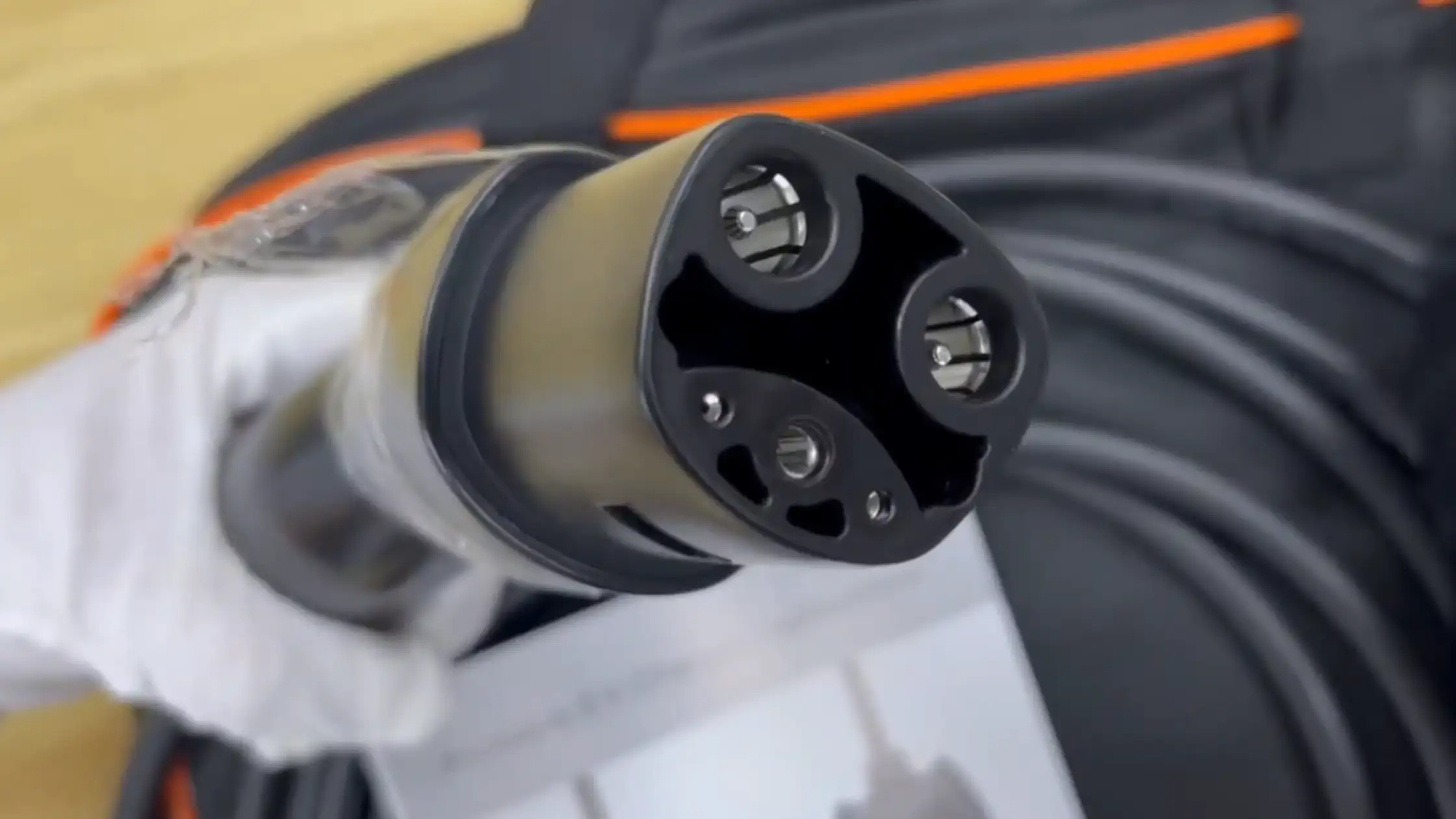
That dual role is the whole point. The older systems used separate hardware for slow and fast charging, which is why a CCS plug looks like a tower with two big pins bolted under a smaller plug. NACS does the same job with one neat package.
Tesla designed the plug for its own cars starting in 2012, opened the specification to the public in late 2022, and the Society of Automotive Engineers adopted it as the J3400 standard in 2023. Ford was the first non-Tesla automaker to commit to a NACS (SAE J3400) Charging Port, followed by GM, Rivian, Hyundai, Kia, Honda, Nissan, Volvo, Polestar, Mercedes, Lexus, BMW, and just about everyone else who sells cars in North America.
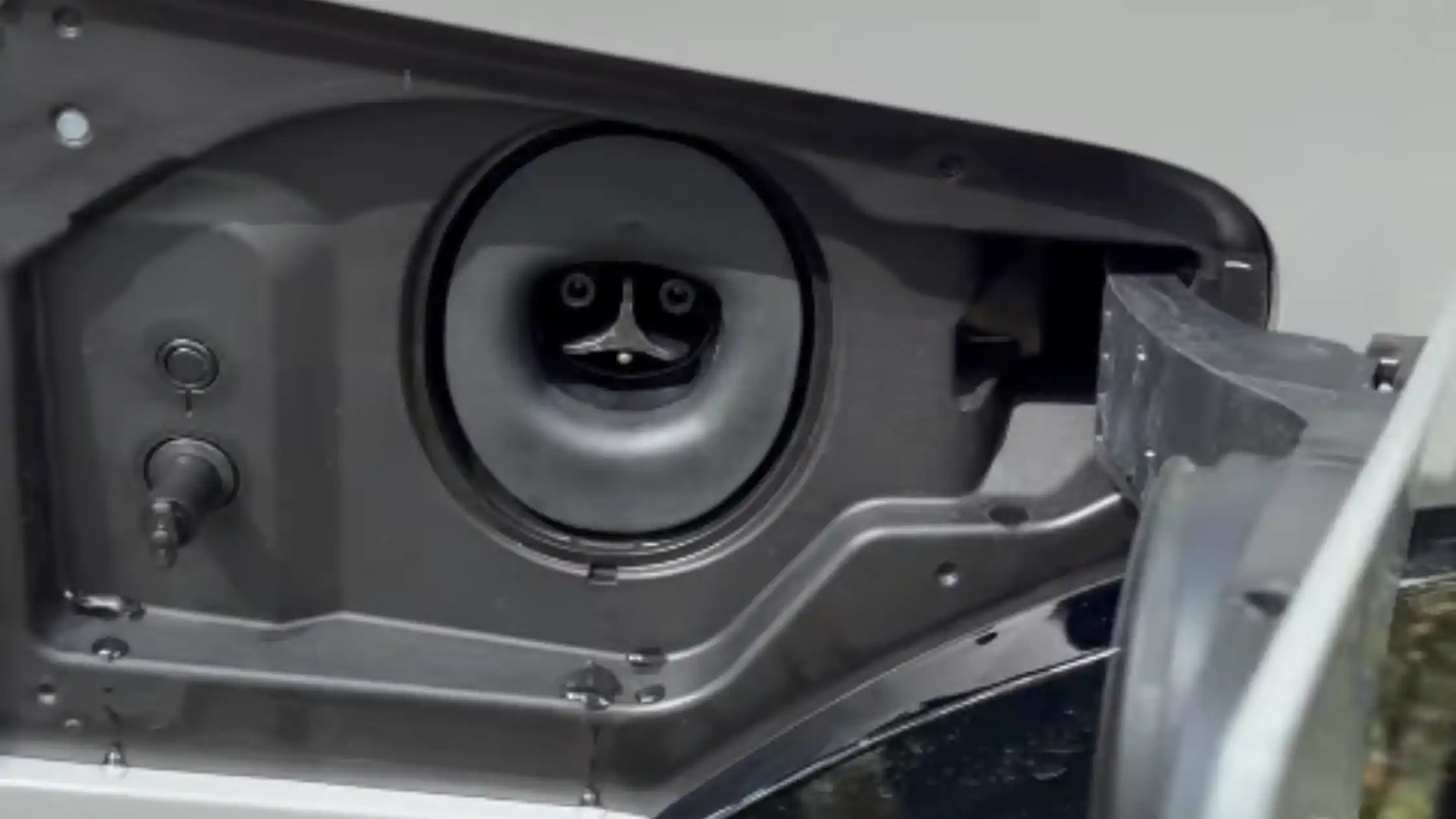
The result is that the Tesla Supercharger network, which used to be a closed garden, is now open to most new EVs. That single change ended the worst headache in American EV ownership almost overnight.
How NACS Works on AC and DC
Every EV needs two kinds of charging. AC charging (Level 1 EV Charging/Level 2 EV Charging) happens at home and at slow public charging stations, where the car’s onboard charger converts AC power into the DC that the battery actually stores. DC fast charging (Level 3 EV Charging) skips the onboard converter and delivers DC power directly to the battery at much higher levels, which is how road-trip charging happens in 20 minutes instead of 8 hours.
NACS handles both jobs through the same two large pins. When you plug in at home, those pins carry AC up to 19.2 kilowatts on a properly wired 80-amp circuit. When you plug in at a Supercharger, the same pins switch over to carry DC up to a theoretical 1 megawatt, although real-world stations today peak at 250 to 350 kilowatts.
The switching is invisible to the driver. The car and the station negotiate the handshake via three signal pins: the station confirms the power it can deliver, the car confirms the kind of power it can accept, and electricity starts flowing. The whole process takes a few seconds.
NACS Pin Configuration and Design
The NACS plug has five pins arranged in a 3-over-2 layout. When viewing the face of the connector or vehicle inlet, the top row contains three smaller pins, while the bottom row contains two larger power pins. Its shared-pin design enables both AC and DC charging via a single set of conductors, resulting in a compact form factor compared to legacy systems like CCS.
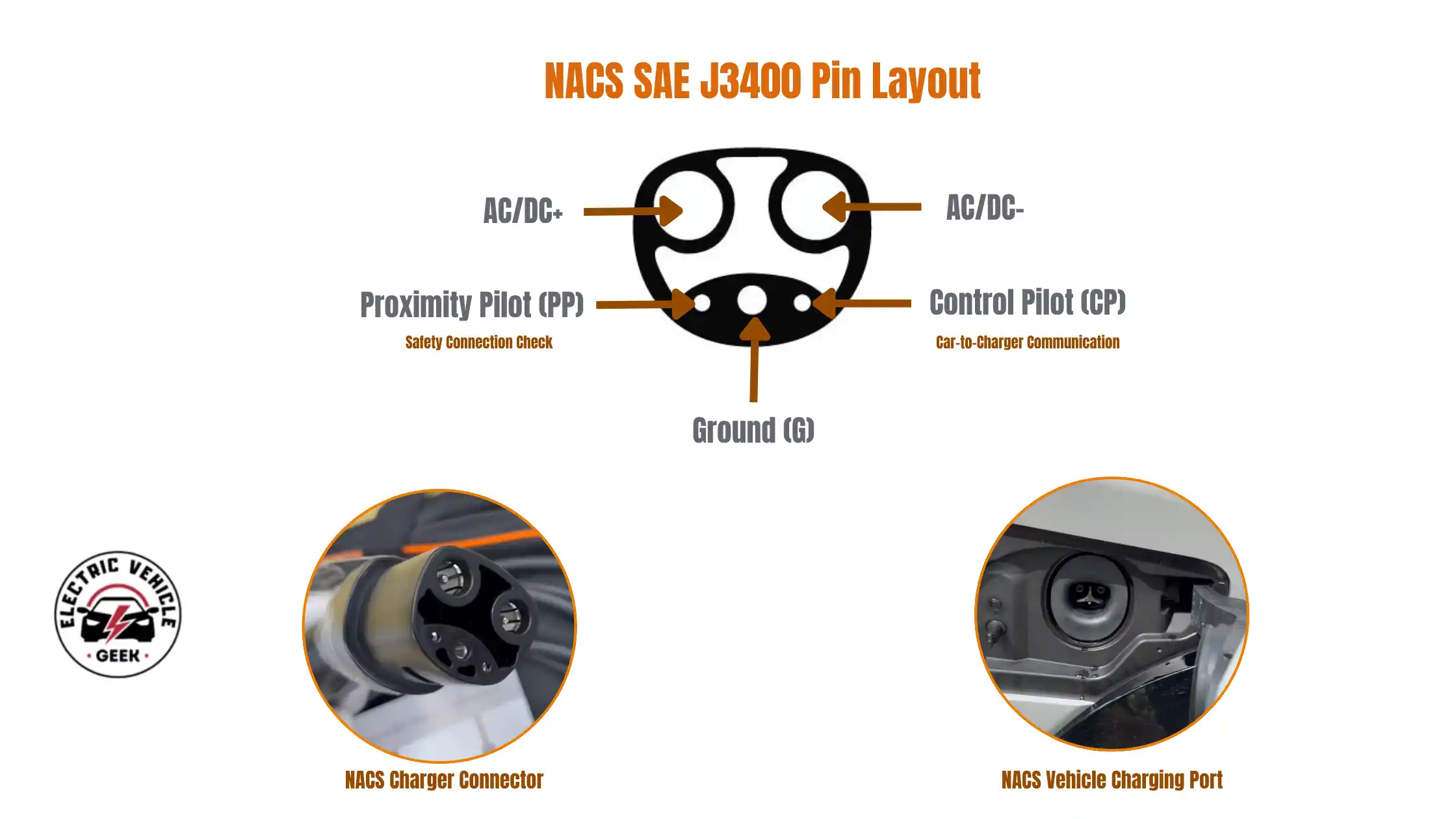
- CP (Control Pilot): Manages digital communication between the vehicle and the charger, including charging limits and status negotiation.
- PP (Proximity Pilot): Provides a safety signal confirming a fully seated connector and triggers an immediate power interruption when the release mechanism is engaged, preventing arcing during unplugging.
- G (Ground): Supplies the protective earth grounding connection for safety.
- DC+ / L1 and DC- / L2: High-current conductors used for both alternating current (AC) charging and direct current (DC) fast charging, depending on the charging mode.
A key innovation of this system, compared to bulkier connectors like CCS1, is that the same two large power pins are used for both AC charging (e.g., home charging) and DC fast charging (e.g., high-speed public chargers). This eliminates the need for separate high-voltage DC pins, enabling a more compact and efficient connector design.
This design is formalized under the SAE J3400 specification by the Society of Automotive Engineers (SAE International). Originally developed by Tesla and later adopted as the North American Charging Standard (NACS), it was standardized to ensure interoperability among manufacturers, charging networks, and hardware providers, enabling seamless compatibility across the EV ecosystem.
The Competitive Advantages of Tesla’s NACS
Tesla’s charging system has won industry adoption because it was designed as a complete, infrastructure-friendly solution rather than just a vehicle connector. Its smaller design, superior communication capabilities, lower installation costs, scalability for future charging needs, and support for broader charging deployment made it attractive to automakers, charging companies, and standards organizations. As a result, NACS is rapidly becoming the dominant EV charging standard across North America.
Charging Speeds You Will Actually See
Marketing materials love to quote the theoretical one megawatt peak. The reality is much more modest, and that is fine because real EVs cannot accept that much power anyway.
At home, an AC charger rated at 48 A delivers 11.5 kW, adding about 30-40 miles of range per hour. That covers overnight charging for almost any battery on the market. A 32-amp charger delivers 7.7 kilowatts and adds about 25 miles of range per hour, which is still enough for most daily driving.
On DC fast charging, current Tesla V3 Superchargers deliver up to 250 kilowatts. V4 stations are rolling out at 350 kilowatts and beyond. Your actual charging speed depends on three factors: the station’s maximum output, your car’s maximum charging rate, and your battery’s state of charge. Most modern EVs hit their peak speed between 10% and 40% state of charge, then taper off as the battery fills.
Which Vehicles Use NACS
The list grew dramatically through 2024 and 2025. Some cars ship with the NACS port built in. Others are still on CCS but include a manufacturer adapter. Here is where things stand for the current and upcoming model years.
| Brand | Models With Native NACS | Year Switched |
| Tesla | Model S, 3, X, Y, Cybertruck (all) | 2012 |
| Ford | F-150 Lightning, Mustang Mach-E (2025+) | 2025 |
| GM | Chevy Equinox EV, Blazer EV, Silverado EV (2025+), Cadillac Lyriq, Hummer EV | 2025 |
| Rivian | R1S, R1T (2025+) | 2025 |
| Hyundai | Ioniq 5, Ioniq 6, Ioniq 9, Kona EV (2025+) | 2025 |
| Kia | EV6, EV9 (2025+) | 2025 |
| Honda | Prologue (2025+) | 2025 |
| Nissan | Ariya, Leaf (2025+) | 2025 |
| Polestar | Polestar 2, 3, 4 (2025+) | 2025 |
| Volvo | EX30, EX90 (2025+) | 2025 |
| Mercedes | EQ lineup (2025+) | 2025 |
| BMW | i4, i5, iX (2025+) | 2026 |
Safety, Certifications, and Thermal Protection
NACS EV chargers and accessories sold in the United States carry UL 2251 certification for the connector itself and UL 2594 for the NACS charging station (Learn more on EV chargers and accessories certifications). Look for these markings on any home charger or adapter you buy. Without them, you have no guarantee the hardware meets basic safety standards.
The plug is rated IP55 for outdoor use, which means full dust protection and resistance to water jets from any direction. You can leave it plugged in during a rainstorm without worrying. Snow and ice are a different story since they can freeze the locking mechanism, which we cover below.
Modern NACS connectors include thermal sensors in the handle and the pins. If anything overheats during a session, the station automatically reduces power before damage happens. This is called derating, and it is the reason your 250-kilowatt charge might drop to 150 kilowatts halfway through a long session in hot weather. The system is protecting itself.
How NACS Chargers Locks and Why It Matters
Unlike older standards, which used a plug that latched onto the car, NACS uses a car-side lock. A small motor inside the vehicle’s charge port pulls the plug into place and holds it there until the session ends. The plug handle itself has no fragile plastic latch that snaps off when someone drops the cable on concrete.
This is genuinely one of the best decisions in modern EV design. CCS handles, by contrast, have an exposed plastic trigger that breaks routinely at busy public stations. A broken trigger renders the entire cable unusable until somebody replaces it.
The downside of car side locking is that if the lock motor fails, the plug stays stuck in your port. Every NACS-equipped vehicle has a manual release pull cord, usually hidden behind a small panel in the trunk near the charge port. Find it before you need it. Tesla owners can also tap the trunk button on the touchscreen or use the phone app to force release.
Cable Weight and Real World Handling
NACS cables are noticeably lighter and more pliable than CCS or CHAdeMO cables. The reason is simple physics. With smaller pins and a more compact connector, you need less copper to deliver the same power. At the high-power end, NACS uses liquid-cooled cables so the conductors can remain thin without overheating.
In freezing weather, this matters. A CCS cable in January can feel like wrestling a frozen garden hose. A NACS cable stays manageable. Drivers who have used both standards almost universally prefer the NACS handling experience.
Choosing NACS Adapters
If you have an older J1772 home charger and a new NACS vehicle, you need a J1772-to-NACS adapter.
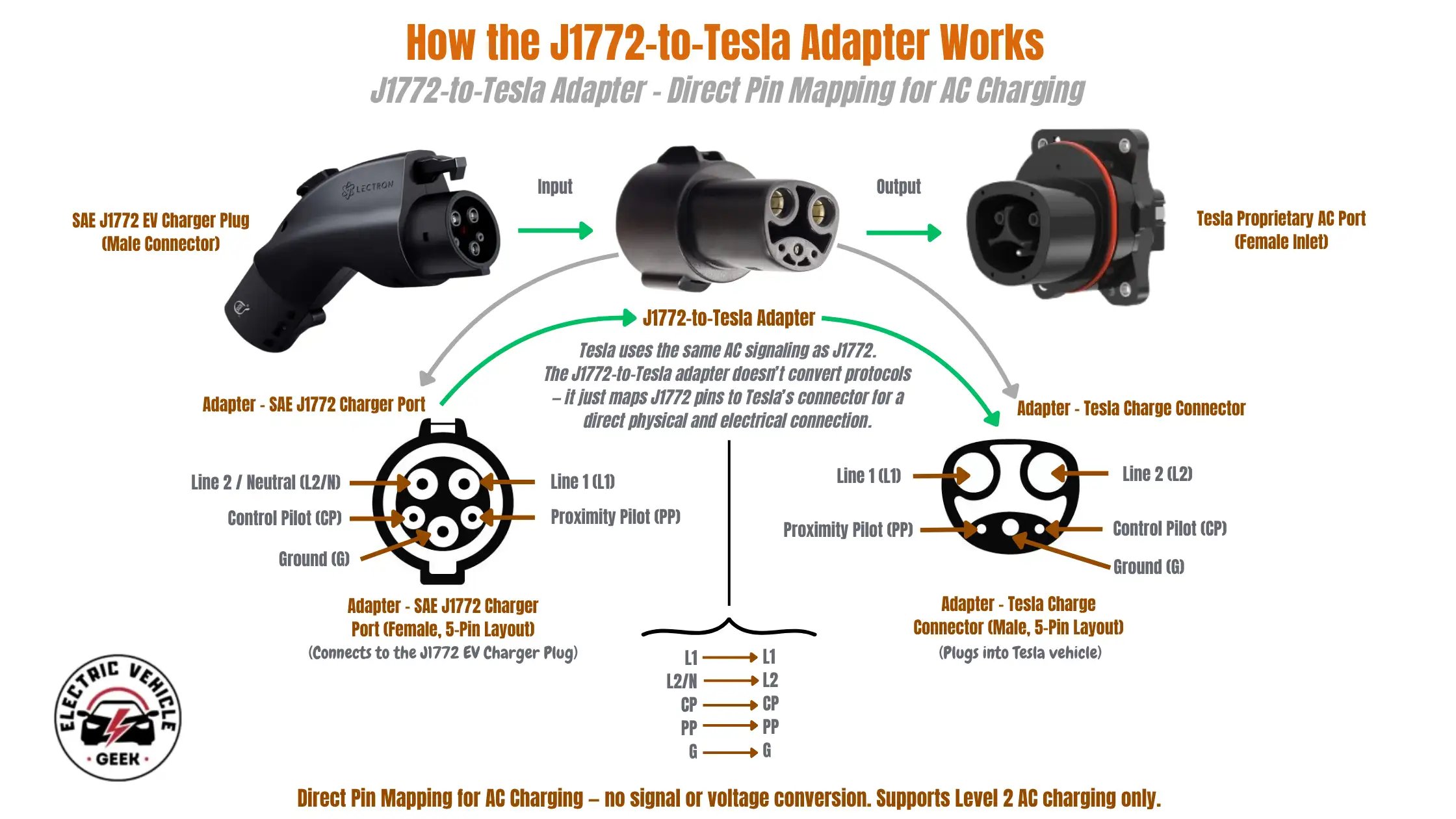
Most automakers include one in the trunk with the car. If yours did not, buy the manufacturer’s adapter or a UL-listed third-party version. Do not buy the cheapest unbranded option on Amazon. AC adapters carry up to 80 amps continuous, and a poorly made adapter can melt or arc.
Check Out J1772 to NACS Adapters We RecommendIf you have a NACS car and want to use a CCS Combo 1 fast-charging station, you need a NACS-to-CCS1 adapter.
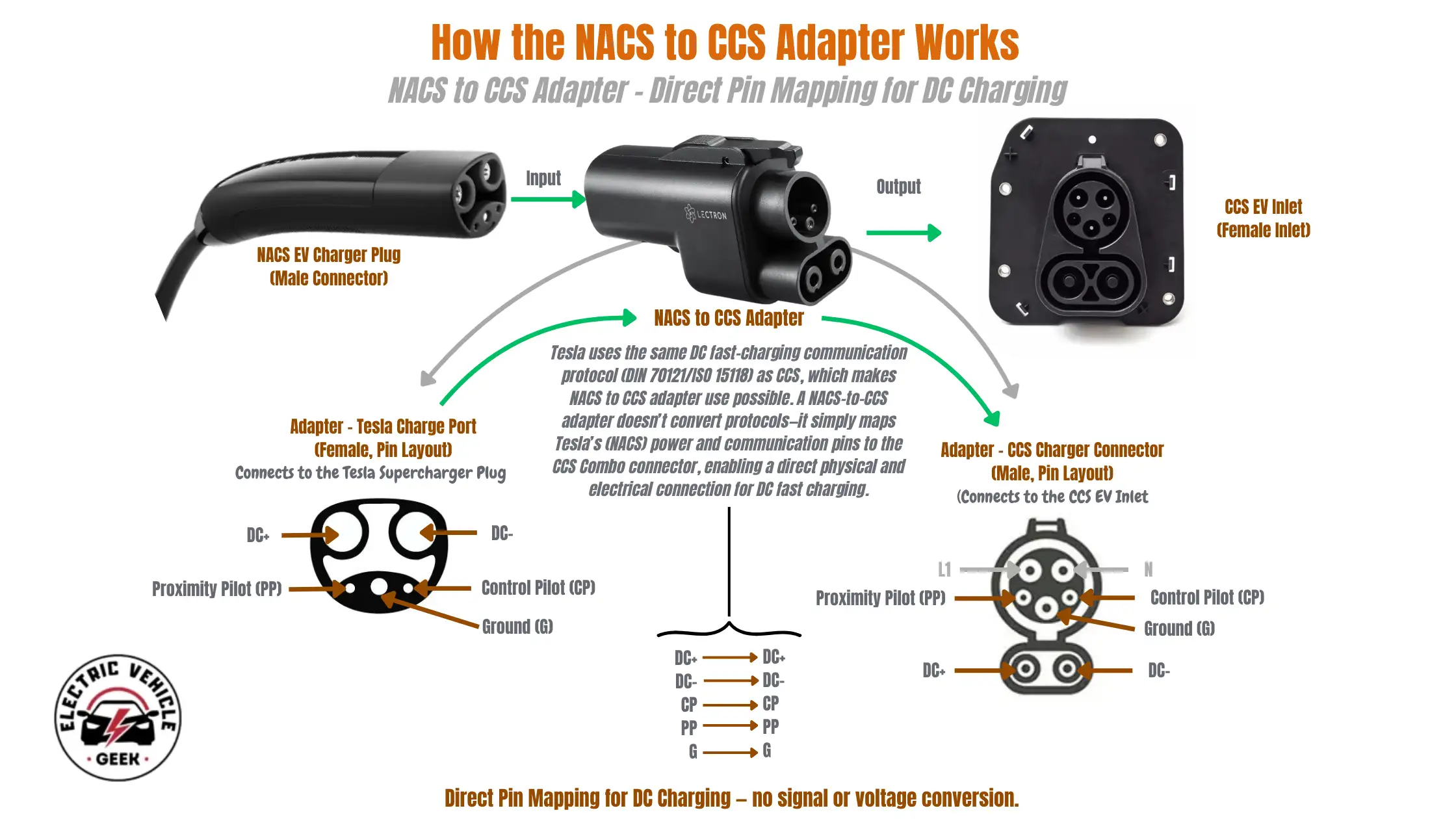
Tesla sells the Magic Dock and a Tesla-branded adapter; Ford and GM ship their own, and aftermarket options are available from A2Z and Lectron. For DC fast charging at hundreds of kilowatts, certification matters even more than for AC charging. Stick with manufacturer- or major-brand adapters. A failure here can damage your car.
Check Out NACS to CSS Adapters We RecommendGoing the other way, if you have a J1772 car and want to charge at a Tesla Supercharger, you need a NACS-to-J1772 adapter.
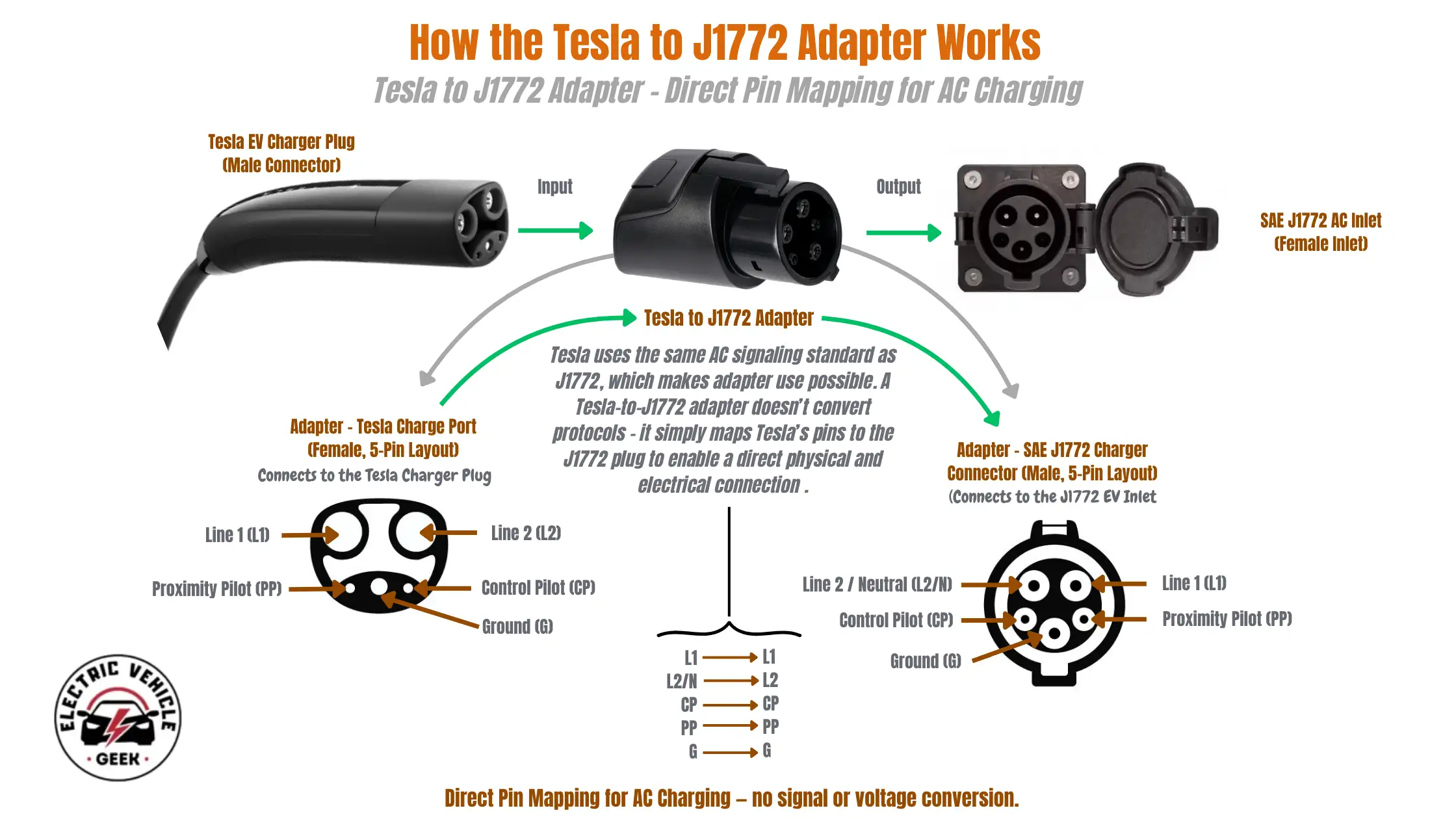
These are available, but compatibility depends on whether the specific Supercharger station accepts non-Tesla vehicles. Check the Tesla app first.
Check Out NACS to J1772 Adapters We RecommendCommon NACS Charging Problems and Quick Fixes
The Plug Will Not Release
Try the unlock button on the car’s screen, in the phone app, or on the key fob. If the car is unresponsive, find the manual release pull cord. On a Tesla, it is behind the trim panel inside the trunk, on the same side as the charge port. For other brands, check the owner’s manual for the emergency release.
Isolation, Fault, or Communication Error
This usually means dirt or moisture inside the port or on the plug pins. Wipe the plug face with a dry cloth, check the car port for debris, and try again. If the error repeats at multiple stations, your car probably needs a service appointment.
Session Stops at Lower Speed Than Expected
This is normal and rarely a fault. Battery temperature, state of charge, and ambient temperature all affect charging speed. If your battery is cold, your car will charge slowly until it warms up. Many EVs let you precondition the battery before arriving at a fast charger, which fixes this.
Is It Worth Buying a NACS Home Charger?
If you drive a Tesla or a 2025-or-newer model from manufacturers such as Ford, GM, Rivian, Hyundai, Kia, or any other automaker that has adopted a native NACS charging port, then yes. A native NACS home charger removes the need to repeatedly attach and detach an adapter, reducing daily friction and the risk of misplacing adapters when multiple drivers use the same vehicle.
Check Out NACS Charger ReviewsIf you drive a 2024 or earlier non-Tesla EV, stick with a J1772 charger for now. When you eventually upgrade your car, you can buy a J1772-to-NACS adapter for under $50 instead of replacing the entire wall unit.
Either way, look for a charger that delivers at least 40 amps on a NEMA 14-50 outlet or 48 amps on a hardwired 60-amp circuit. Smart features like scheduling and energy monitoring are worth having. Wi-Fi connectivity lets you charge during off-peak utility rates, which can cut your home charging costs by half.
How NACS Compares to Other EV Charger Plugs and Connectors
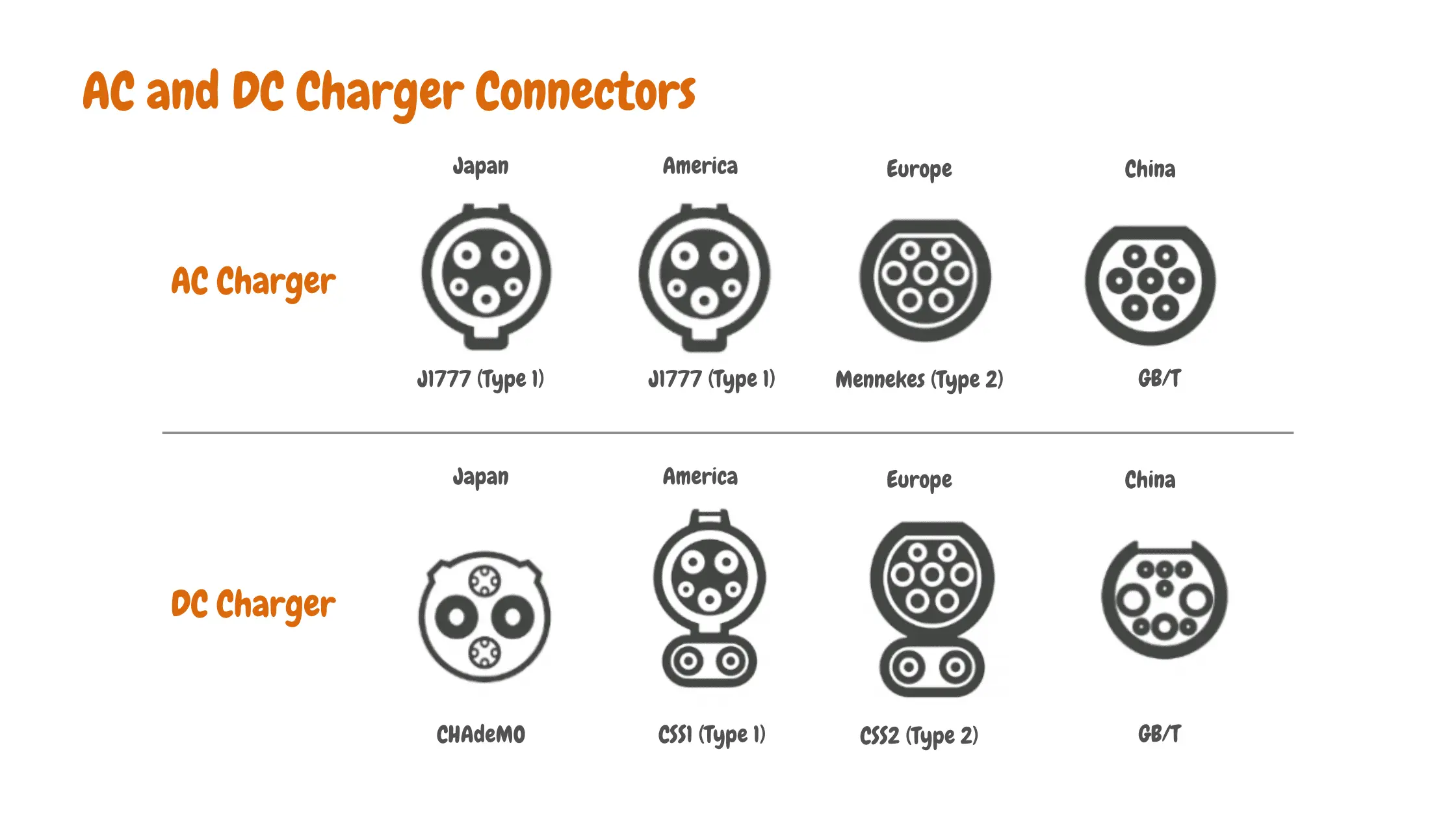
Here is how every major EV connector stacks up in terms of power, region, and use case. Use this table to see at a glance where this standard fits in the wider charging world.
| EV Charger Connector Types | Region | Max AC Power | Max DC Power | Pin Count |
| NACS (J3400) | North America | 19.2 kW | 1,000 kW (theoretical) | 5 |
| CCS Combo 1 | North America | 19.2 kW | 360 kW | 7 |
| J1772 (Type 1) | North America, Japan | 19.2 kW | Not supported | 5 |
| Type 2 / CCS2 | Europe, Oceania | 43 kW (3 phase) | 360+ kW | 9 |
| CHAdeMO | Japan, legacy global | Not supported | 400 kW | 10 |
| GB/T | China | 27.7 kW | 237.5 kW (900 kW ChaoJi) | Dual port |
The Bottom Line on NACS
NACS won the standards war in North America by being simpler, lighter, and better integrated than its competitors. If you are buying an EV in 2025 or later, you are getting NACS whether you ask for it or not. That is good news. The plug is well designed, the network is huge, and the Plug and Charge experience is what charging should have been all along.
Plan your home setup around it. Get a UL-listed adapter for any legacy gear. And keep that manual release pull cord in mind for the rare day you actually need it.

James Ndungu is a certified EV charger installer with over five years of experience in EVSE selection, permitting, and installation. He holds advanced credentials, including certification from the Electric Vehicle Infrastructure Training Program (EVITP) and specialized training in EV charging equipment and installation, as well as diplomas in EV Technology and Engineering Fundamentals of EVs. Since 2021, James has tested dozens of EV chargers and accessories, sharing expert insights into the latest EV charging technologies.